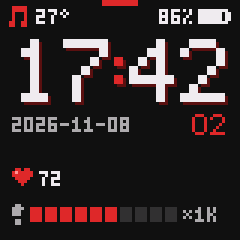
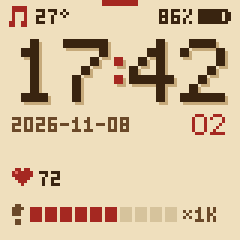
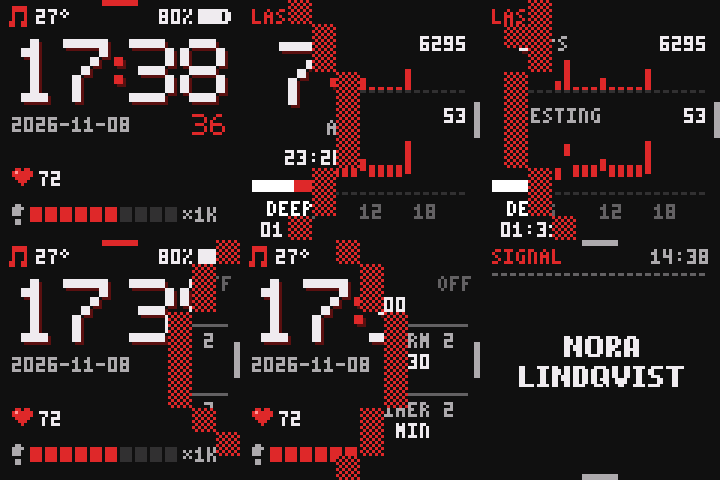
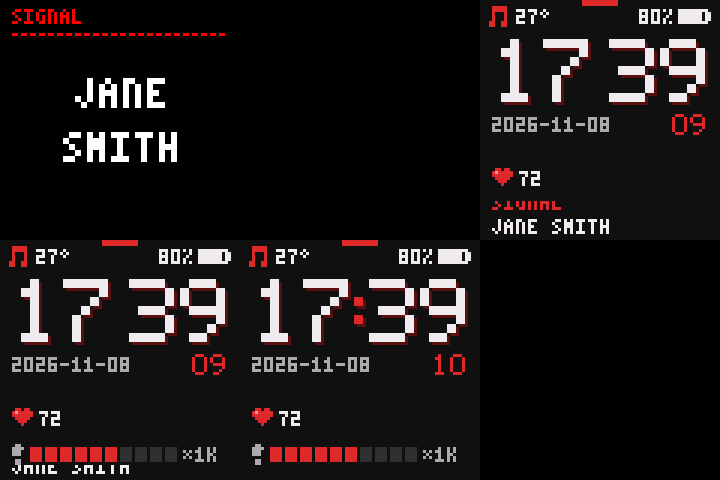
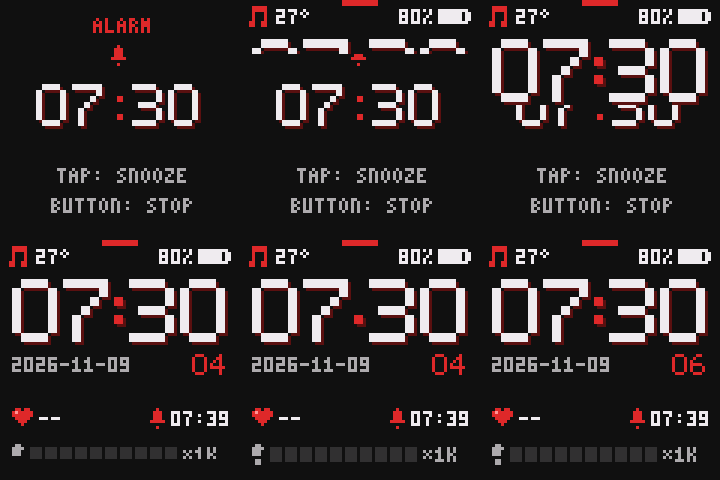
It does what you'd expect of a smartwatch (time, notifications, steps, heart rate, alarms, timers, music control, "find my watch"), and these on top:
- Quiet nights: once you fall asleep, or nap, notifications neither buzz nor light the screen, and touches don't wake it, until your alarm or you're up. Alarms, timers, calls, and "find my watch" still ring. Woken with the button, the screen works as usual (dimly) while you use it, and stays on while you hold a finger on it.
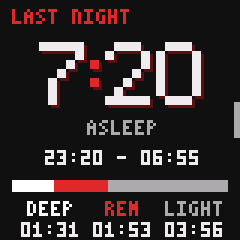
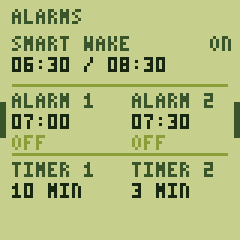
- Sleep stages and smart wake: light, deep, and REM sleep, from movement and heart rate. Smart wake rings in the half hour before your time when you stir after ten minutes of light sleep (not deep or REM), or at your time if that doesn't come, and alarms build up from faint taps.
- Adaptive heart rate: every 2 to 20 minutes, more often after you move, while you sleep, or while it's high. Each try starts once your wrist is still, or two minutes on if it never is, and keeps going for up to 30 s even if you start typing again, as a moment's calm may come. If a still wrist gives none, it tries a brighter LED for up to 15 s more, and again within 10 minutes. Awake, every other reading's tries start with the brighter LED, an experiment to see if that reads better at a desk. After half an hour without a reading, it tries every 10 minutes, without waiting for a still wrist, and may spend up to twice the LED time until one comes. To watch it live (with your steps), open Gadgetbridge's Live activity chart: the watch measures continuously while it's open.
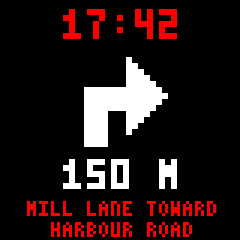
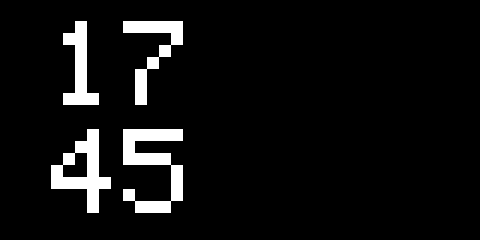
- A dim glance: turn your wrist, and the time shows dimly for a few seconds without lighting the screen. While Google Maps, OsmAnd, or CoMaps navigates, so does the next turn, with two taps as it comes within 50 m.
- Media gestures: double-tap to play or pause, and tap, then tap and hold, to skip, whether the screen is off, on a glance, or on the clock face. A buzz says it took.
- Screens in four directions around the clock: the past to one side, alarms and settings to the other, notifications above, and the button grid, music, and the room's air below.
- A button grid for Home Assistant or Tasker: six buttons, each tapped, double-tapped, or held (and released, for hold-to-dim), or two layers of nine for codes 1–99 (2, then 3, is 23). Sent over Bluetooth as BTHome button events, a trigger each in Home Assistant's automation editor (or all in one, with a blueprint for each layout), or through Gadgetbridge. See docs/buttons.md.
- The room's air: a nearby Aranet4 (with Smart Home integrations on) gives the clock face the room's temperature, and its CO₂ gets a screen. So does an unencrypted BTHome thermometer (such as a Xiaomi LYWSD03MMC on pvvx's firmware); the nearest sensor wins, and one only heard faintly (through a wall, say) doesn't count. Without one, the watch estimates the room from its own warmth, learning from any sensor it meets: roughly ±2–3 °C on the wrist once it has, worse before, in the cold, or while you exercise.
- Follows the sun: dark colour schemes after sunset and light ones by day, a choice of each (themes), and a screen that's brightest while the sun is up and dim from midnight until you get up.
- Gadgetbridge without gaps: with InfiniTime's protocol, Gadgetbridge records steps and heart rate only while connected, and no sleep. ur speaks the Bangle.js protocol instead, and keeps the last 24 hours of activity for stock Gadgetbridge to fetch once the phone is back.
- Nothing lost: before the battery runs flat, or when put away in storage mode, the watch saves what the phone hasn't fetched and switches off. A crash restarts it at once, and leaves a backtrace in the logging build's log.
- Releases you can check: each one rebuilds byte for byte from its tag, and carries a GitHub attestation (see Verifying).
Caveats: ur is experimental and personal: it's tested on two watches, and heart rate and sleep are still being tuned against a Garmin, so treat sleep stages as a rough guide. Steps come from the accelerometer's own counter, which skips walks of under about 8 steps and much stop-and-go walking indoors: a day around the house reads lower than a phone or a Garmin, though long walks count within a few percent. It needs an Android phone with Gadgetbridge, which can't install updates on a Bangle.js, so those go through another app or a computer. Once it has switched off (a flat battery, or storage mode), the watch doesn't know the time, or ring alarms, until the phone reconnects.
How it was built: in Rust, on embassy. It was written largely by Claude (Anthropic's model), steered and tested on real hardware by a human. That's me, Jon, 👋, but yes, this is very much LLM-written, Jon-guided! Although I'm also quite happy with what I've now landed on, and am daily driving this in real life :)
In Gadgetbridge, add the watch "Bangle.js ur", choose Pair, and type the passkey the watch shows when Android asks. Gadgetbridge then sets the time and forwards notifications on its own, and shows the battery. It fetches activity (steps, heart rate, sleep) only when you pull down on its device list, or tap Synchronize (the circular arrow) on the watch's card, or, with Settings → Automations → "Auto fetch activity data" on, when you unlock the phone (that needs a screen lock; "Minimum time between fetches" spaces them out). It passes steps, heart rate and sleep on to Health Connect if you like (its "Sync after device sync"): after the first sync since the watch started, after the one that brings a night, then after a sync at most every 2 hours, which ends with a short "End : Fetching sports details" message. A night reaches Gadgetbridge in one piece, once its sleep stages are settled: about 47 minutes after you get up and walk about (or take the watch off), or 2¼ hours if you don't (details). For the themes to follow your sun rather than Oslo's, the phone has to share its location: see C03. A few Gadgetbridge defaults need changing: see docs/gadgetbridge.md.
The clock face shows the time, date, battery, heart rate, the next alarm or timer, and the room's temperature: a nearby room sensor's, to the tenth (21.4°), or else, to the degree (21°), estimated from the watch's own on the wrist, or the watch's own off it. Steps fill ten blocks of 1,000 (×1K) towards 10,000, then of 10,000 (×10K); Today has the exact count, since midnight in the phone's time zone (after a flight across midnight, the new zone's). A bar along the top means unseen notifications; a note in the top left, that music is playing; a faded Bluetooth rune struck through in red there, that the phone isn't connected. The battery's percentage climbs on the charger no faster than the cell fills, and reads 100% only once charging is done, so it doesn't drop when the watch comes off; 0% is where it switches itself off.
On the charger, the screen lights up as soon as the watch makes contact (dimly in a quiet night), so you see at once that it charges. Every 5 minutes there, outside a quiet night and not over anything on screen, a dim glance shows the charge and how long until full (FULL IN 0:40, a rough guess that errs long). Once the charge is done, the watch buzzes twice and shows FULL, big, for a few seconds (the button puts it away), so you know it can come off: once a charge, after any alarm, call or update on screen has finished; in a quiet night it waits, dark and silent, for the first time you wake the screen after the night. A watch set on the charger full says nothing. The heart rate isn't measured there (the clock face says OFF, and its LED stays dark); taken off, the watch measures again two minutes later, or after 10 seconds if you look at the clock face.
Notifications show the app and who it's from (the sender, or the
title without one), never what it says, and without emoji (nor the
:shortcodes: Gadgetbridge sends in their place, here or in a
caller's name or what's playing). One that comes with
the screen on shows along the bottom for 4 seconds; with the
screen off, it gets the whole screen, dimly, the name centred, and large
if it's short.
Screens: swipe right for Today (steps and heart rate by the hour), then Last night; left for Alarms, the alarms set in Gadgetbridge, the settings (LOOK, then BUTTON GRID), then Info; down for the last three notifications; up for the button grid (if on), Music, and Air (while a room sensor is near: its CO₂, temperature, humidity and pressure, or those it measures). A short bar on an edge means there's more that way.
Touch and button:
- Wake the screen with the button, or a firm tap away from the edge (brushes don't count). During a quiet night, only the button wakes it.
- The button goes back to the clock, or off from it. It also stops "find my watch" (as does a touch), and a double press ends a quiet night.
- Long-press (the watch buzzes once it's taken, at 0.6 s) switches an alarm or timer on or off, and on Info, offers storage mode.
- Media: double-tap to play or pause, and tap, then tap and hold (until the buzz, 0.6 s), for the next track, the hold within half a second of the tap. A long press alone does nothing. On the clock face, anywhere (for 3 s after a touch woke it, the hold only in the middle: a quarter of the screen away from the top and bottom, a fifth from the sides, clear of a folded arm). With the screen off or on a glance, the hold always in the middle, nothing at the edge, and nothing in a quiet night; tap lightly first to leave the screen off: a firm first tap wakes it, and the second touch then does the same. On a glance, only a heavy first tap (75 ms or more) wakes it at once; a lighter firm tap waits half a second for a second touch, and wakes it if none comes. Without a phone connected, a double tap wakes a dark screen instead.
- A call: tap ANSWER or DECLINE, or press the button to silence it.
- A ringing alarm: tap to snooze for 9 minutes; press the button to stop it.
On the settings' LOOK, tap THEME for the next colour scheme, FORCE to show the day's schemes (DAY) or the night's (NIGHT) whatever the sun says, or follow the sun (NONE), and LIGHT to switch brightness from AUTO to SOFT, a step dimmer, for a longer battery. With one scheme for the time of day, THEME is dim and can't change, nor FORCE with schemes of one side only: a tap says why (FAQ D01, D02). On BUTTON GRID, the next, tap BUTTONS to turn on the button grid, GRID for its layout (six buttons, or two layers), and BTHOME KEY (while presses go over BTHome) for the key Home Assistant asks for (see Home Assistant). To set an alarm or timer, tap it, then swipe the hours and minutes. Alarms set in Gadgetbridge are read-only on the watch; a one-off one switches itself off once it has rung, without Gadgetbridge hearing of it, so switch it off and on there to set it again. Alarms follow the phone's time zone and summer time, from when Gadgetbridge sends the change (at once, if connected); the night summer time starts or ends, each rings once, one in the skipped hour as the clock jumps. An alarm that comes round while another rings (smart wake too) rings as soon as that one is done.
Gadgetbridge forwards directions from Google Maps and OsmAnd by default; turn CoMaps on in its settings, under "Navigation apps".
Download ur-<version>-dfu.zip from the latest release: the
same package installs ur over InfiniTime and updates it afterwards.
ur-logging-<version>-dfu.zip is the same firmware keeping a log in the
watch's flash, for reporting problems; it costs a little battery, and
CONTRIBUTING.md explains fetching the log.
Send the zip over Bluetooth with either of these:
-
Nordic's nRF Device Firmware Update app (also on the App Store): select File, the ZIP ("Distribution packet") type, and the zip; then Device, the watch ("InfiniTime" the first time, "Bangle.js ur" after that); then Start. For updates, use the phone Gadgetbridge paired with the watch: the app relies on that pairing (see U01), and on Android, turn on Keep bond in the app's Settings first, or the phone forgets that pairing after each update (see U03).
-
A Linux computer, with
scripts/dfu.pyfrom this repository (pip install bleakfirst).<MAC>is the watch's address, whichbluetoothctlshows while scanning.# The first install: python3 scripts/dfu.py ur-<version>-dfu.zip --address <MAC> # Updates, once paired in bluetoothctl (agent KeyboardOnly, # default-agent, pair <MAC>, then type the passkey the watch shows), # take about half a minute: python3 scripts/dfu.py ur-<version>-dfu.zip --address <MAC> --packet-size 240
How the watch looks is its theme: Retro, the one in the screenshots,
with colour schemes for the night and for the day. A build can
have other themes instead, or as well: LOOK's THEME row then steps
through every scheme built in. The themes there are, with what they
look like, are in src/themes/. A release has a package
of each other theme, ur-<theme>-<version>-dfu.zip, installed as
above (one with colour schemes for only night or only day shows them
by day and by night alike); to build any other
mix, see CONTRIBUTING.md, and to make a theme
of your own, AUTHORING-THEMES.md.
- On InfiniTime 1.16 or later, turn on the OTA switch in Settings. If you're sending with the nRF app and Gadgetbridge is connected to InfiniTime, disconnect it there: InfiniTime takes one connection at a time, so the app wouldn't find the watch.
- Send the zip. If the nRF app stalls at 14% with "GATT CONN TIMEOUT" (InfiniTime's side of the transfer), send it from a computer instead.
- The watch shows the PINE64 logo for about a minute while the bootloader swaps the images. Leave it be until ur's clock face appears.
- In Gadgetbridge, remove the InfiniTime device, and forget the watch in Android's Bluetooth settings too. Then add "Bangle.js ur" in Gadgetbridge, choose Pair, and type the passkey the watch shows. Within seconds, Gadgetbridge shows the battery, and firmware "ur" with its version; if not, disconnect and connect again there (see C05). The watch keeps ur once the phone has set the time; until then, a reset puts InfiniTime back.
Send a newer zip; Gadgetbridge can stay connected. The watch resets into the new version, and keeps it once Gadgetbridge has synced the time again; a reset before that goes back to the old one. Today's steps, and the activity the phone hasn't fetched, carry over.
To roll back by hand, hold the button for about 7 seconds, until the watch resets into the bootloader, and keep holding: release when the logo turns blue for the previous firmware, or red for PINE64's recovery firmware, a minimal InfiniTime to reinstall from.
Each release file carries a GitHub attestation. To check that a download is exactly what this repository's release workflow built, with the GitHub CLI:
gh attestation verify ur-<version>-dfu.zip --repo jonhoo/urReleases are also reproducible: CONTRIBUTING.md shows how to rebuild one and compare.
When the watch points you here, it shows an entry's code: a letter for its area (B the button grid, C connectivity, U updates, P power, S sensors, D display and touch, A alarms, N notifications, E errors), and a number.
With GRID on 2 LAYERS, that's by design: see B04.
It lists a BTHome device's events only once it has seen each: tap, double-tap and hold (for 1.5 s, for "Long press" too) each grid button once (with two layers, any one). "Hold release" needs Home Assistant 2026.11 or later; older versions ignore it.
The watch made a new key: it lost track of how many presses it had encrypted with the old one, and reusing that count would let anyone listening decode them. Give Home Assistant the new key from Settings → BTHOME KEY, as when you set it up.
The watch shows *B04 by GRID when it's on 2 LAYERS and
BUTTONS on BTHOME or BOTH. Two layers make codes 1–99 (none
ends in 0: the first button is the tens digit, the second the ones),
and BTHome can't send each as a button of its own. Its buttons carry no
number, so Home Assistant tells them apart only by their place in the
advertisement, and an encrypted advertisement has room for about 15
bytes of data: six buttons, not one per code. So each press fires two
events instead: a button event for the gesture (press,
double_press, hold_press, long_press if held on to 1.5 s, then
hold_release on lifting after a hold), and a dimmer event, which can
carry a number, turning by the code: dimmer_1 right for a tap,
dimmer_2 right for a double tap, dimmer_3 right for a hold, and
dimmer_3 left for a long press (none for a release). To act on
one code, trigger on its dimmer and direction (rotate_right or
rotate_left: without it, a hold's trigger fires for its long press
too), in YAML (a Manual event trigger in the automation editor).
For 2, then 3, double-tapped:
triggers:
  - trigger: event
    event_type: bthome_ble_event
    event_data:
      address: "E5:12:34:56:78:9A"   # from BTHOME KEY
      event_class: dimmer_2          # double tap
      event_type: rotate_right
      event_properties: { steps: 23 }
Or skip the YAML: the two-layer blueprint matches codes and gestures for you. docs/buttons.md covers both ways in full.
With 6 BUTTONS instead, each button is its own BTHome button
(button_1 to button_6), with a trigger in the automation editor for
each button and gesture, no YAML needed. See
docs/buttons.md.
The watch couldn't send that grid press to Home Assistant: both its Bluetooth connections were in use, usually the phone plus a computer (fetching the field log, or updating it). Disconnect the computer, and press again.
A phone or computer connected without pairing, and ur only talks to devices paired with its passkey. Remove the watch from Gadgetbridge, if it's there, and forget it in Android's Bluetooth settings (Android may still hold InfiniTime's pairing). Then add it in Gadgetbridge, choose Pair, and type the 6-digit passkey the watch shows.
The watch disconnects a device that hasn't started pairing within 40 seconds, so it can't hold a connection the phone needs, and says "NOT PAIRED" at most every five minutes, however often the device comes back. Info's PHONE row shows it whenever one is connected. If it isn't yours (a phone that paired with the watch under InfiniTime, say), forget the watch on that device to stop it.
The watch remembers pairing with this phone, but the phone has forgotten it, for instance after the watch was removed from Android's Bluetooth settings. Remove the watch from both Android's Bluetooth settings and Gadgetbridge, then add it again in Gadgetbridge and type the passkey.
Without one, the themes and brightness follow the sun in Oslo. The watch asks Gadgetbridge for the phone's location when it connects with none from the last day, or after two hours apart (at most once an hour), when the time zone changes, and when it first hears a room sensor or stops hearing one (at most four times a day), and keeps the last one. Gadgetbridge only passes on fresh locations, and only with all of these on:
- In the watch's settings in Gadgetbridge: "Use phone GPS data", with "Only use network to determine location" off (with it on, no location ever arrived in testing).
- In Gadgetbridge's own settings, under Location: "Keep location updated".
- In Android's settings for Gadgetbridge: location permission "Allow all the time", and location itself on.
Phones without Google Play services may have no network location, so nothing arrives indoors until the watch happens to ask while the phone is outside.
Gadgetbridge didn't pass a button grid press on to other apps: turn on "Allow Intents" in the watch's settings in Gadgetbridge.
Nothing the watch sends reaches Gadgetbridge: it most likely asked for it before the link was paired, was refused, and carried on regardless. The watch notices within about 10 seconds and disconnects once, and Gadgetbridge reconnects and asks again. If that didn't help:
- In Gadgetbridge, disconnect the watch and connect it again.
- Check its device type in Gadgetbridge is Bangle.js. An entry left from InfiniTime for the same watch never works: remove it.
- Remove the watch from Gadgetbridge and Android's Bluetooth settings, and add it again as in C01.
Steps and sleep come separately, when Gadgetbridge fetches them: see Using it.
The firmware on the watch has only one colour scheme for this time of
day (or for the side FORCE pins), so THEME has nothing to switch
to. For more, install a release's ur-<version>-dfu.zip, which has
Retro's, several for each side, or another theme's package,
ur-<theme>-<version>-dfu.zip (see Installing). Or
build one with every theme in it (--features themes-all), or the
themes you like (see CONTRIBUTING.md). An
update keeps the scheme you had for each side, if the new firmware has
it.
The firmware on the watch has colour schemes for one side of the day
only (a theme with night schemes only, say), so it shows them by day
and by night alike, and FORCE has nothing to pick between. That's
how such a theme is: for schemes of both sides, install a release's
ur-<version>-dfu.zip, which has Retro's, or another theme's package
with both (a release's notes say which have one side only; see
Installing), or build one with themes of both sides (see
CONTRIBUTING.md).
The watch thinks you're asleep: it's a quiet night. It ends with the morning's first alarm, or once you've been up for 22 minutes (7 after a nap, which is sleep between 09:00 and 20:00). If you're up before either, double-press the button.
Gadgetbridge's "Text as Bitmaps" is on: it sends what the watch's font
can't show as pictures, which ur shows as ?. Switch it off in the watch's settings in
Gadgetbridge, under Notifications.
Use storage mode: long-press the Info screen (swipe left from the clock, past Alarms, any alarms from Gadgetbridge, and the settings), then tap to confirm. The watch saves the activity the phone hasn't fetched and switches itself off, using roughly 40% of a full charge in six weeks. Press the button or plug in the charger to wake it; the phone sets the time when it reconnects, and gets the saved activity with its next sync.
The nRF Device Firmware Update app only works over a paired link: if the phone hasn't paired with the watch, the app tries a different kind of update, and fails. Pair first (see C01 and C02), then send the update again.
The update arrived, but the watch checked it before installing it and found something wrong: it was damaged or cut short on the way, or it isn't firmware for this watch (a zip for another device, say). The watch keeps the firmware it has. Send the zip again; if it's refused again, download it again, and verify it.
The Android nRF Device Firmware Update app makes the phone forget its pairing with the watch when an update finishes, unless Keep bond is on in the app's Settings (under "Legacy DFU"); it's off by default. The watch still remembers the phone, so it says "PAIRING LOST". Pair again as in C02, and turn on Keep bond before the next update.
CONTRIBUTING.md covers building, iterating on a dev kit, fetching logs from a sealed watch, and making releases.
Licensed under either of
- Apache License, Version 2.0 (LICENSE-APACHE or http://www.apache.org/licenses/LICENSE-2.0)
- MIT license (LICENSE-MIT or http://opensource.org/licenses/MIT)
at your option.
The firmware images also contain third-party code under its own terms:
- Nordic Semiconductor's Bluetooth controller and protocol scheduler
(through the
nrf-sdcandnrf-mpslcrates), provided in binary form under the Nordic 5-Clause licence, which only permits their use with Nordic chips, such as the PineTime's nRF52832. -
src/bma423_config.bin, Bosch's BMA423 feature-engine configuration, under the BSD-3-Clause licence insrc/bma423_config.LICENSE.
Unless you explicitly state otherwise, any contribution intentionally submitted for inclusion in the work by you, as defined in the Apache-2.0 license, shall be dual licensed as above, without any additional terms or conditions.